CAN Bus Analyser: Features, Tools, and Selection Guide
02 September 2026
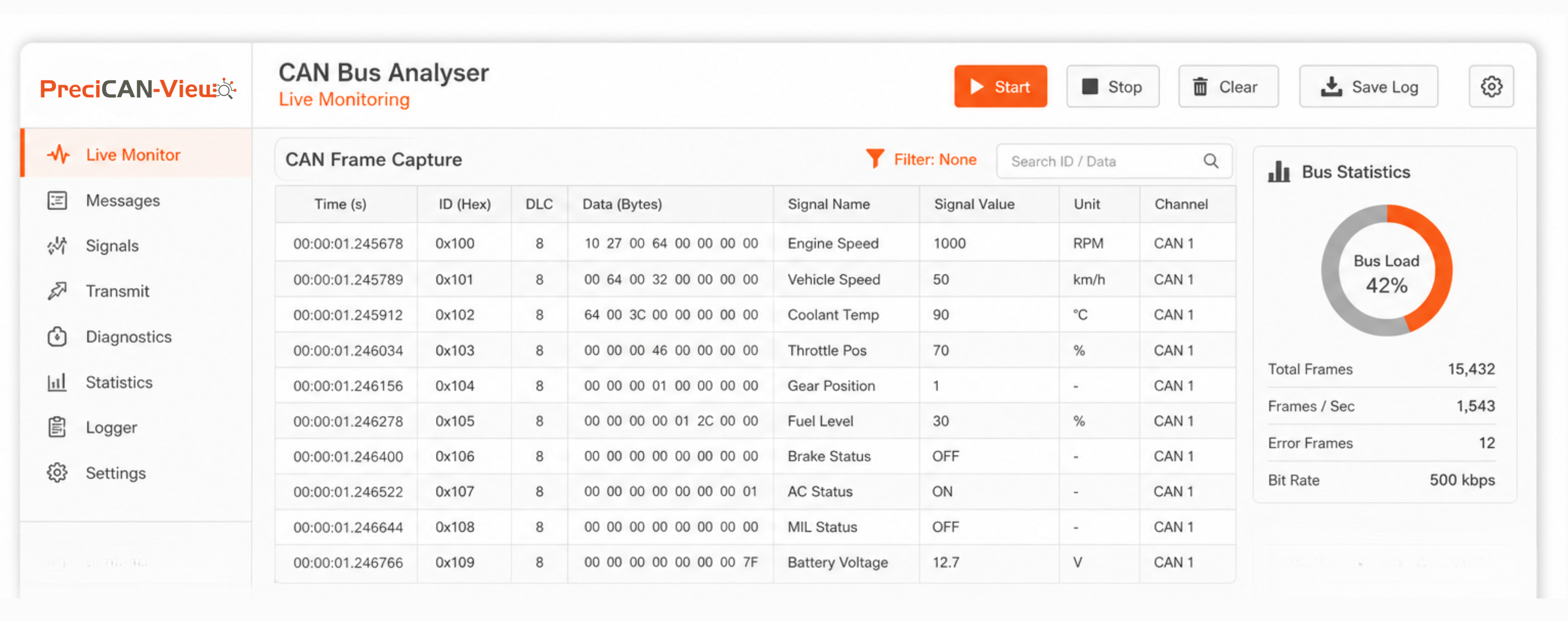
A CAN bus analyser is the essential diagnostic and development tool for anyone working with vehicle networks or industrial CAN bus systems — a combination of hardware interface and CAN bus diagnostic software that makes the invisible flow of CAN frames visible, interpretable, and debuggable. Whether the task is verifying that a new ECU's messages conform to the network specification, troubleshooting a communication fault in a prototype vehicle, or running automated end-of-line tests on a production line, a CAN bus monitoring tool provides the real-time visibility and logging capability that CAN bus engineering requires. A CAN bus sniffer (passive capture) is the starting point — but most engineering applications need a complete vehicle network analyser with active transmit capability, DBC signal decode, UDS diagnostic support, and sufficient logging throughput to capture busy multi-ECU CAN networks at full bus load. This guide covers the key features to evaluate and the criteria for choosing the right CAN bus analyser for development, testing, and production applications.
Core CAN Bus Analyser Capabilities
- Real-Time Frame Capture and Display: The fundamental function of any CAN bus monitoring tool — receiving all CAN frames on the bus and displaying them with arbitration ID, DLC, data bytes, and timestamp. A good CAN bus analyser provides microsecond-resolution timestamps, allowing engineers to verify inter-frame gaps and message cycle times against specification.
- DBC Signal Decode: CAN bus diagnostic software with DBC file support automatically translates raw CAN frame bytes into named, unit-qualified signals — engine RPM, vehicle speed, coolant temperature — making traffic from a vehicle network analyser immediately interpretable without manual byte-to-value calculation.
- Active Transmit / CAN Bus Simulation: Beyond passive CAN bus sniffer functionality, a full CAN bus analyser transmits specific messages — sending UDS diagnostic requests, simulating missing ECU traffic, injecting test patterns for ECU testing, or generating bus load for stress testing.
- Filtering and Triggering: On a busy vehicle CAN bus with 500–2000 messages per second, a CAN bus monitoring tool that displays everything simultaneously is unworkable. Pass/stop filters limit display to specific message IDs; trigger functions start or stop capture when specific CAN conditions occur — a message with a specific ID and data pattern, or a bus error frame.
- Bus Error Detection: A CAN bus analyser that reports error frames, bit stuffing errors, CRC errors, and node error counter states helps diagnose physical layer problems, termination issues, and ECU error confinement transitions — faults that a basic CAN bus sniffer may miss entirely.
CAN Bus Analyser Comparison: Key Selection Criteria
| Feature | Basic CAN Bus Sniffer | Full CAN Bus Analyser / Vehicle Network Analyser |
|---|---|---|
| Channels | Single CAN channel | 2–8 simultaneous CAN/CAN FD channels |
| CAN FD Support | Classic CAN only (1 Mbit/s max) | CAN FD up to 8 Mbit/s data phase |
| DBC Decode | Raw frames only | CAN bus diagnostic software with live DBC signal decode |
| Transmit | None (passive CAN bus sniffer) | Full transmit — periodic, one-shot, UDS request sequences |
| Timestamp Resolution | Millisecond (PC software clock) | Microsecond hardware timestamp |
| Diagnostics | Frame display only | UDS diagnostic protocol, OBD-II, J1939 diagnostic support |
CAN Bus Diagnostic Software: What to Expect
The software component of a CAN bus analyser determines how usable the hardware is in practice. Good CAN bus diagnostic software should provide: a frame trace view (all received frames in time order); a message statistics view (cycle time, message count, bus load per ID); a signals view (DBC-decoded values displayed numerically and graphically); an error counter view (transmit error counter, receive error counter, bus-off events per node); a replay function (transmit previously captured frames to simulate traffic); and export functions (CSV, MDF, BLF format export for post-test analysis in offline tools). For the most demanding vehicle network analyser applications — protocol compliance testing, timing verification — scripting interfaces (Python, CANalyzer CAPL) enable automated test sequences in CAN bus diagnostic software.
Choose the Right CAN Bus Analyser with Precisol Automation
Precisol Automation's CAN to USB Adapter provides the hardware foundation for a complete CAN bus analyser setup — a high-speed, multi-channel CAN interface connecting to industry-standard CAN bus diagnostic software for real-time monitoring, DBC signal decode, UDS diagnostics, and automated test sequences. Compatible with standard CAN bus monitoring tool software platforms, the adapter supports both CAN bus sniffer and active transmit operation at full 1 Mbit/s CAN speed. The CAN Data Logger extends the vehicle network analyser capability to standalone data capture without a connected PC.
See the CAN bus analyser in EOL production testing in our CAN to USB adapter for EOL testing case study, or explore how Precisol enables CAN bus analyser applications across automotive development and testing workflows.
Frequently Asked Questions
What is a CAN bus analyser and what is it used for?
A CAN bus analyser is a hardware and software tool capturing, displaying, and decoding CAN bus traffic in real time. Engineers use a CAN bus monitoring tool to troubleshoot network faults, verify message timing, validate ECU communication, and run automated tests. CAN bus diagnostic software decodes raw frames using DBC files and supports UDS diagnostic protocol for combined monitoring and diagnostic workflows.
What features should I look for in a CAN bus monitoring tool?
Essential CAN bus analyser features include: multi-channel support, CAN FD capability, DBC file decode for CAN signal decoding, microsecond timestamp resolution, bus load display, message filtering and triggering, and UDS diagnostic protocol support. A vehicle network analyser with active transmit goes beyond a basic CAN bus sniffer — enabling ECU simulation and automated test sequences in CAN bus diagnostic software.
What is the difference between a CAN bus analyser and a CAN bus sniffer?
A CAN bus sniffer passively captures traffic without transmitting. A full CAN bus analyser adds active transmit — sending UDS requests, simulating ECU traffic, and injecting test patterns — in addition to monitoring. CAN bus diagnostic software for a vehicle network analyser typically includes both receive and transmit; basic sniffer tools capture only. Most engineering applications require a full analyser rather than a passive sniffer.