CAN Bus Data Logging: Methods, Tools, and Best Practices
26 June 2026
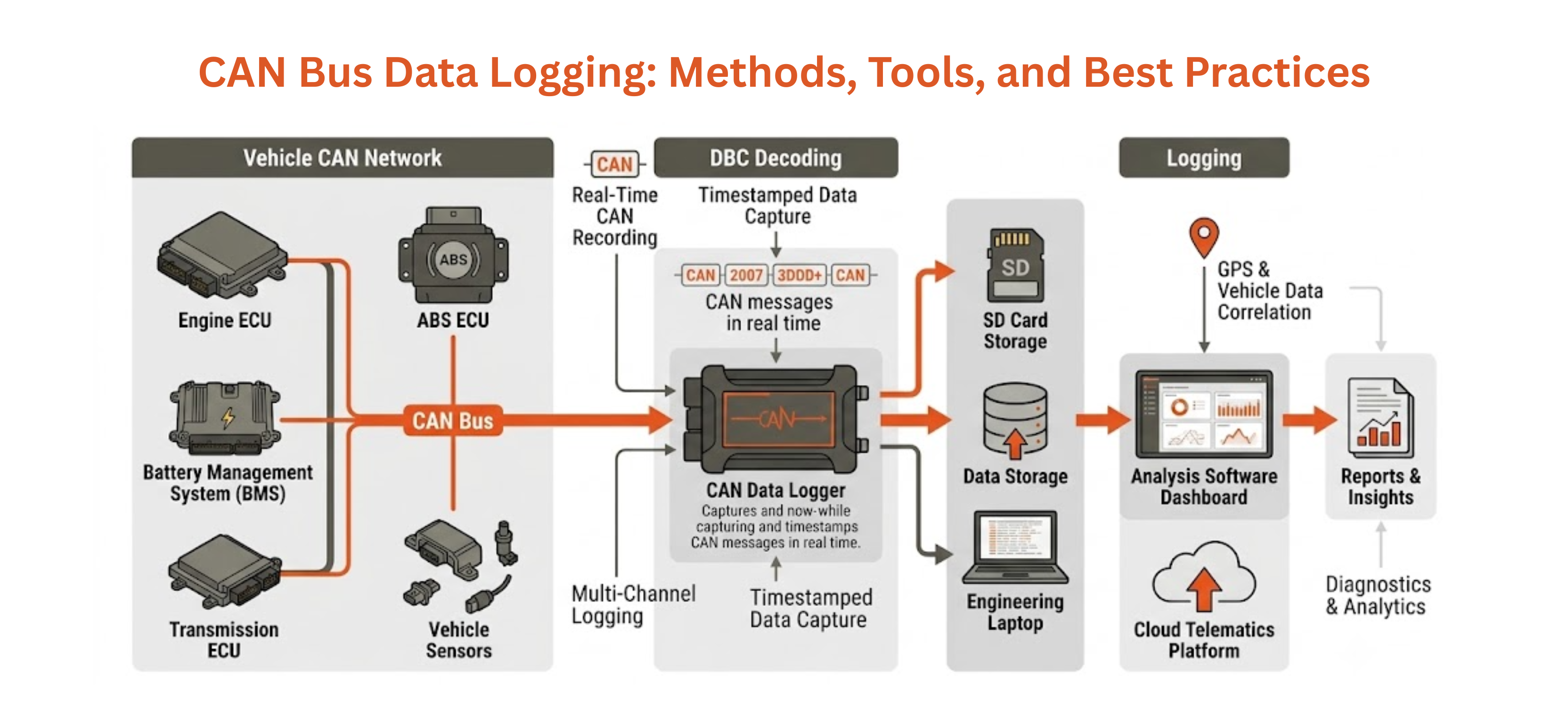
CAN bus data logging is the process of capturing and storing all message traffic on a Controller Area Network for subsequent analysis. Whether you are developing a new ECU, validating a vehicle on a test track, diagnosing an intermittent fault in the field, or building a fleet telematics platform, a reliable CAN data logger is essential. This guide covers the primary CAN bus recording methods, what to look for in a CAN data logger, common automotive test data formats, and best practices for getting clean, usable logs every time.
Why CAN Bus Data Logging Matters
A modern vehicle generates thousands of CAN messages per second across multiple networks. Without CAN bus data logging, this stream of vehicle data capture disappears the moment it is transmitted. With a CAN data logger in place, every frame — engine speed, brake pressure, battery SoC, gear position — is timestamped and stored. Engineers can replay these logs offline, decode them against a DBC (database CAN) file to extract physical signal values, and correlate them with GPS position, video, or environmental data for comprehensive automotive test data analysis.
CAN bus recording is also the foundation of compliance testing. Regulations in markets including the EU and North America require documented evidence that vehicle systems behave within specification across defined operating conditions. Without a CAN data logger producing traceable automotive test data, meeting these requirements is impossible.
CAN Bus Data Logging Methods
There are three primary CAN bus data logging approaches, each suited to different scenarios:
- PC-Based CAN Bus Recording: A CAN to USB or CAN to Ethernet interface connects the vehicle network to a laptop running analysis software. This method provides real-time CAN bus data logging with immediate DBC decoding, filtering, and display — ideal for lab bench testing and ECU development. The limitation is the dependency on a connected PC, making it unsuitable for unattended field vehicle data capture.
- Standalone CAN Data Logger: A dedicated hardware CAN data logger operates autonomously — no laptop required. It records to internal flash or an SD card, typically triggered by ignition, a threshold event, or a pre-defined schedule. Standalone CAN bus data logging is essential for field testing, long-duration reliability trials, and fleet deployments where vehicle data capture must happen without an engineer present.
- Telematics Gateway CAN Bus Recording: A CAN telematics gateway performs CAN bus data logging and transmits selected signals to the cloud in real time over cellular (4G/LTE). This combines the autonomy of standalone CAN bus recording with live visibility — field teams can monitor vehicle data remotely and trigger diagnostic sessions without physical access to the vehicle.
Key Specifications of a CAN Data Logger
| Specification | Why It Matters for CAN Bus Data Logging |
|---|---|
| CAN Channels | Modern vehicles use multiple CAN networks; a good CAN data logger supports at least 2 simultaneous channels |
| Timestamp Resolution | 1 µs or better for reliable CAN bus recording of high-frequency automotive test data |
| Storage Capacity | SD card or eMMC; CAN bus data logging at 1 Mbit/s generates ~100 MB/hour of raw automotive test data |
| Trigger Options | Ignition, CAN signal threshold, time-of-day, or external input for conditional vehicle data capture |
| Protocol Support | Classic CAN, CAN FD, J1939 for commercial vehicle CAN bus recording |
| Output Formats | MF4, BLF, ASC, CSV — compatibility with standard automotive test data analysis tools |
Best Practices for CAN Bus Data Logging
- Always Use a DBC File: Raw CAN bus recording produces hex frames — meaningless without a database file to decode signal names and physical units. Pair every CAN data logger session with the relevant DBC to turn raw bytes into readable automotive test data.
- Set Appropriate Filters: Logging every frame on a busy CAN bus recording session fills storage quickly. Filter to relevant message IDs during vehicle data capture, or use a post-processing pass to extract only the signals needed for your analysis.
- Synchronise Timestamps: For multi-channel CAN bus data logging or correlation with GPS and video, ensure all data sources share a common time reference — either GPS-based or via hardware trigger. Misaligned timestamps destroy the value of automotive test data.
- Log in the Harshest Conditions: Intermittent faults rarely appear in ideal conditions. Configure your CAN data logger to capture vehicle data continuously during cold starts, high-vibration events, and temperature extremes to catch elusive CAN bus recording anomalies.
Choose the Right CAN Data Logger with Precisol Automation
Precisol Automation offers purpose-built hardware for every CAN bus data logging scenario — from bench development to long-duration field trials. The CAN Data Logger delivers standalone CAN bus recording with multi-channel support, SD card storage, and flexible trigger options for unattended vehicle data capture. For development and real-time CAN bus data logging at the bench, the CAN to USB Adapter provides a direct, reliable connection from any CAN network to your PC.
See how CAN bus recording in action delivered real automotive test data results in our AMR testing case study, or discover how Precisol tools support professional EV vehicle field testing with precision vehicle data capture.
Frequently Asked Questions
What is CAN bus data logging used for?
CAN bus data logging is used to record all network traffic for later analysis — covering ECU development, field testing, fault diagnosis, end-of-line testing, and fleet telematics. Any application that needs traceable automotive test data from a vehicle network relies on CAN bus recording.
What file formats does a CAN data logger typically produce?
A CAN data logger typically records MF4, BLF, ASC, and CSV formats. MF4 is the preferred automotive test data format for professional CAN bus recording due to its timestamping precision and native DBC signal decoding support.
What is the difference between a CAN data logger and a CAN analyser?
A CAN data logger records CAN bus traffic to storage for later analysis, often operating standalone in the field. A CAN analyser displays and decodes traffic live on a PC. Many modern CAN bus data logging devices combine both functions, offering real-time display alongside persistent vehicle data capture.