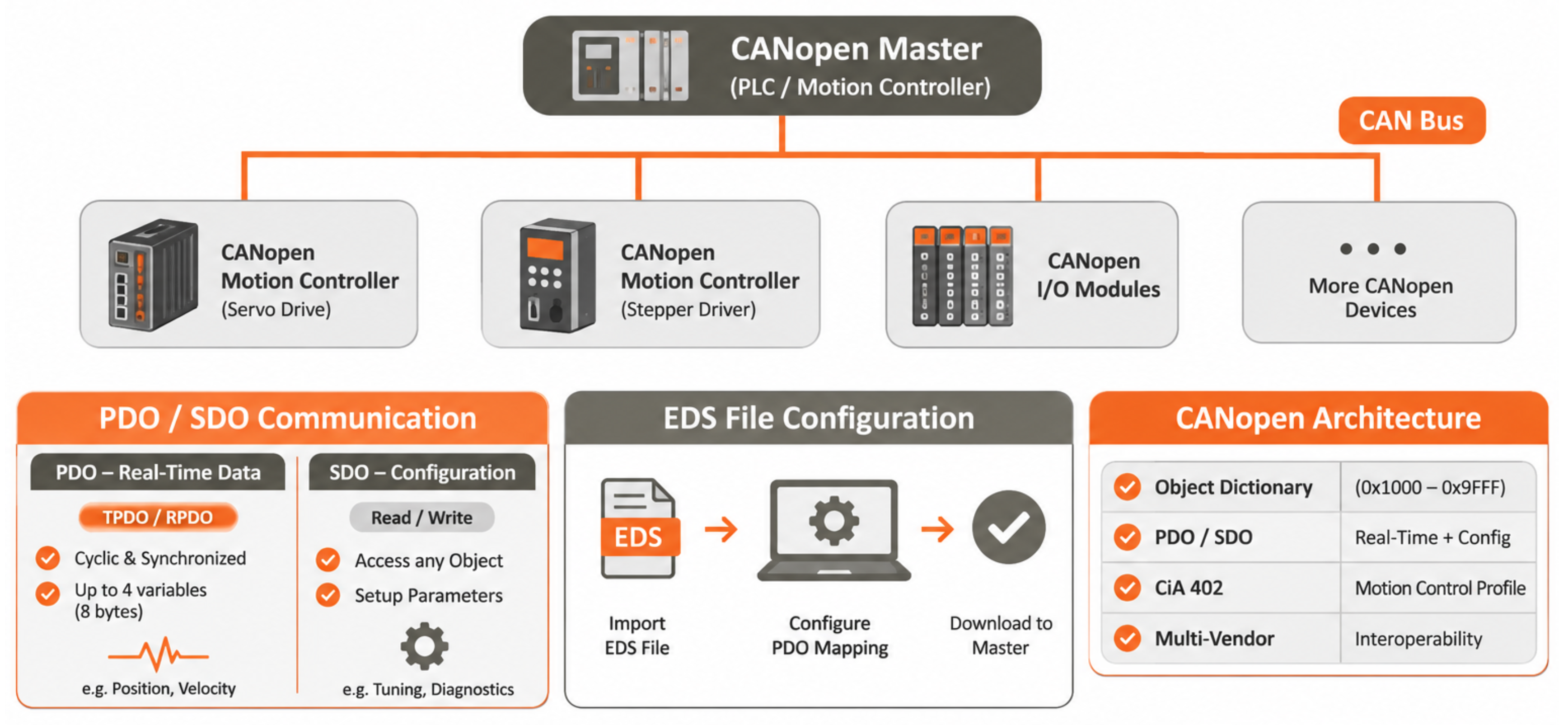
CANopen protocol industrial automation is the most widely adopted higher-layer CAN bus protocol in embedded motion control, industrial robots, and modular I/O systems — providing a structured application layer (object dictionary, PDOs, SDOs, network management) that makes CAN bus devices from different manufacturers interoperable in a common automation network. While ISO 11898 CAN bus defines how bits are transmitted on the wire and how CAN frames are structured, it says nothing about what those frames mean or how devices should organise their data — this is where CANopen protocol industrial provides the standardisation that makes multi-vendor CAN networks practical. A CiA 402-compliant CANopen motion controller (servo drive, stepper driver) from any vendor can be connected to any CANopen PLC master and configured using the device's CANopen EDS file configuration — the EDS (Electronic Data Sheet) file that describes the device's object dictionary in a standard text format. The PLC configuration tool reads the EDS file, knows which objects (parameters, setpoints, feedback values) the device supports, and configures the PDO mappings automatically — without the engineer needing to know the specific register layout of every vendor's device. This interoperability contrasts with proprietary industrial protocols where each vendor's device requires vendor-specific configuration tools and knowledge. CANopen PDO SDO communication provides both real-time process data exchange (PDOs, cyclic/synchronised) and configuration access (SDOs, confirmed client-server) in a single network, making CANopen suitable for both the high-frequency data exchange needed for motion control and the startup configuration needed to set drive parameters, encoder resolution, and control mode. This guide covers the CANopen protocol industrial architecture, CANopen PDO SDO communication mechanisms, CANopen EDS file configuration workflow, CANopen motion controller use cases, and the CANopen vs DeviceNet comparison for protocol selection decisions.
CANopen Protocol Industrial: Object Dictionary and PDO/SDO Architecture
- Object Dictionary — Device Data Structure: The object dictionary is the core data structure of CANopen protocol industrial — a structured table of objects (each identified by a 16-bit index and 8-bit subindex) holding the device's communication parameters, device-specific parameters, and process data variables. Standard objects (Index 0x1000–0x1FFF): communication parameters common to all CANopen devices — device type, error register, PDO communication parameters, SDO parameters, and heartbeat time. Application-specific objects (Index 0x6000–0x9FFF): device profile-specific objects — for CiA 402 CANopen motion controller drives: control word (0x6040), status word (0x6041), target velocity (0x60FF), actual position (0x6064). CANopen EDS file configuration describes each object with its data type, default value, access type (read-only, write-only, read-write), and PDO mappability.
- CANopen PDO SDO Communication — Real-Time vs Configuration: CANopen PDO SDO communication divides device communication into two categories: PDOs for real-time cyclic process data (up to 4 process variables in 8 bytes per CAN frame, cycle time 1–100 ms typical in CANopen motion controller applications) and SDOs for point-to-point object access (configuration, diagnostics, infrequent parameter updates). PDO mappings define which object dictionary entries appear in each PDO frame — configured at startup via SDO writes to the PDO communication parameter objects, or loaded from the master PLC's CANopen configuration tool using the CANopen EDS file configuration. SYNC message (from CANopen master) triggers all synchronous TPDOs simultaneously, enabling position and velocity data from multiple CANopen motion controller axes to be synchronised within one CAN bit period (1 μs at 1 Mbit/s).
- CANopen EDS File Configuration — Device Integration: CANopen EDS file configuration workflow: obtain the EDS file from the device manufacturer (supplied with every CiA-compliant device); import into the CANopen configuration tool (CANopen Magic, PEAK-System, Beckhoff TwinCAT, or controller vendor tool); tool reads the object dictionary structure from the EDS and presents a GUI for PDO mapping configuration — drag objects to PDO slots to assign which process variables are transmitted cyclically; export the resulting network configuration to the CANopen master (PLC or motion controller master); commission the network. The EDS file is the mechanism that makes CANopen protocol industrial multi-vendor interoperability practical — without EDS, the engineer must configure every PDO mapping manually from the device manual.
- CANopen vs DeviceNet — Selection Criteria: Choose CANopen protocol industrial when: European-origin equipment (CNC machines, Beckhoff/Bosch/B&R PLC, robots with CiA 402 drives) requires CAN network integration; embedded motion control on mobile machinery (agricultural, construction) needs a lightweight, deterministic protocol without heavy IT infrastructure; or CiA device profiles provide certified interoperability for the specific device type. Choose DeviceNet when Allen-Bradley PLC architecture with existing DeviceNet scanner cards and ODVA-certified I/O is the plant standard. For new designs in either geography, industrial Ethernet (EtherNet/IP, PROFINET) is increasingly preferred over both.
CANopen Protocol Industrial: Communication Object Comparison
| Object Type | CANopen PDO SDO Communication Function | Use in CANopen Motion Controller |
|---|---|---|
| TPDO (Transmit PDO) | Node broadcasts process data cyclically | Drive broadcasts actual position, velocity, status word |
| RPDO (Receive PDO) | Node receives setpoint updates from master | Drive receives target velocity, control word from master |
| SDO Read | Master reads single object from node | Read drive temperature, fault code, firmware version |
| SDO Write | Master configures node object at startup | Write rated current, encoder resolution, ramp time — CANopen EDS file configuration |
CANopen Protocol Industrial with Precisol Automation
Precisol Automation's CAN Bus Gateway supports CANopen protocol industrial monitoring and data logging — connecting to CANopen networks as a passive listener or active node to capture PDO data, log SDO transactions, and bridge CANopen process data to MQTT or Modbus for IIoT cloud integration. The CAN Data Logger records complete CANopen network traffic for offline analysis and CANopen motion controller commissioning debugging.
See CAN bus integration in our autonomous mobile robot testing using CAN datalogger case study, or explore industrial AMRs field testing using CAN bus gateway for the CANopen protocol industrial monitoring and commissioning tool applications.
Frequently Asked Questions
What is the CANopen protocol and how is it used in industrial automation?
CANopen protocol industrial is a CiA-standardised (CiA 301) application layer built on CAN bus (ISO 11898), defining the object dictionary structure, PDO/SDO communication, and NMT network management used by embedded motion controllers, industrial robots, modular I/O, and mobile machinery automation. CANopen EDS file configuration uses Electronic Data Sheet files from each device to auto-configure PDO mappings in the master PLC — enabling multi-vendor CANopen motion controller networks where drives, encoders, and I/O from different manufacturers interoperate via standard object profiles (CiA 402 for drives, CiA 406 for encoders).
What is the difference between CANopen PDO and SDO communication?
CANopen PDO SDO communication: PDOs (Process Data Objects) exchange real-time process data — TPDOs broadcast actual position/velocity/status cyclically (1–100 ms, triggered by SYNC or timer); RPDOs receive target setpoints and control words. PDOs carry up to 8 bytes (4 process variables) per CAN frame with no handshaking overhead. SDOs (Service Data Objects) are confirmed client-server messages for reading or writing individual object dictionary entries — used for startup configuration, parameter changes, and diagnostics. SDOs are slower than PDOs but access any object in the CANopen EDS file configuration dictionary.
How does CANopen compare to DeviceNet for industrial automation?
CANopen vs DeviceNet: both are CAN bus application layer protocols — CANopen protocol industrial is European (CiA standard), dominant in embedded motion control and European automation; DeviceNet is US (ODVA/Allen-Bradley), dominant in North American factory automation with Allen-Bradley PLCs. CANopen uses separate power wiring; DeviceNet distributes 24V on the bus cable. Both support up to 127 nodes, use EDS files for device description, and divide communication into real-time I/O and explicit message (equivalent to PDO/SDO). For new designs, industrial Ethernet (EtherNet/IP, PROFINET) is increasingly preferred over both CANopen vs DeviceNet options.