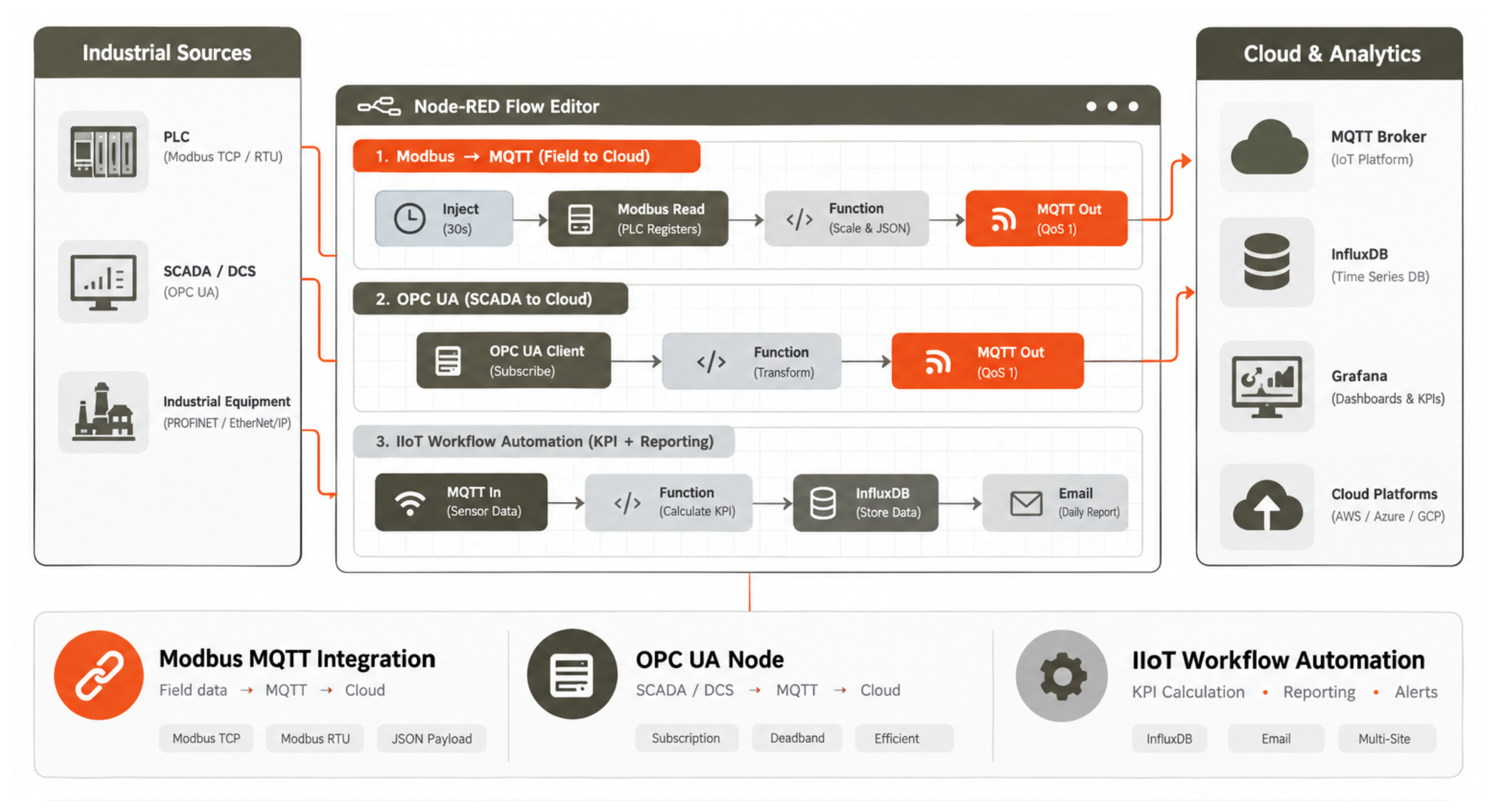
Node-RED industrial automation IoT has become one of the most widely used middleware tools in the IIoT integration layer — providing a visual, low-code programming environment that lets industrial engineers and system integrators build complex data integration flows between PLCs, SCADA systems, IoT cloud platforms, databases, and messaging systems without the development overhead of writing and maintaining custom application code. Originally developed by IBM for IoT prototyping and released as an open-source project, Node-RED has been adopted heavily in industrial IoT because it solves the specific problem that manufacturers face when deploying IIoT: the need to bridge between legacy industrial protocols (Modbus RTU, OPC DA, PROFINET) and modern IoT platforms (MQTT, REST API, cloud time series databases) using a tool that a controls engineer can learn and maintain without becoming a software developer. The community-maintained node library (over 4,000 nodes on npmjs.com) covers virtually every industrial protocol and cloud service: Node-RED Modbus MQTT integration with the node-red-contrib-modbus package; Node-RED OPC UA node with node-red-contrib-opcua; Siemens S7 protocol with node-red-contrib-s7; EtherNet/IP with node-red-contrib-cip-ethernet-ip; and output to InfluxDB, Kafka, SQL, email, Slack, and dozens of cloud platforms. A Node-RED industrial gateway running on an industrial edge PC or Raspberry Pi can implement the entire IIoT workflow automation pipeline — from Modbus polling to MQTT publishing to cloud dashboard update — in a visual flow that a technician can modify in the browser-based editor without redeployment downtime. This guide covers the most common Node-RED industrial automation IoT use cases, the step-by-step Node-RED Modbus MQTT integration flow, Node-RED OPC UA node configuration, and practical IIoT workflow automation patterns for industrial data integration.
Node-RED Industrial Automation IoT: Key Use Cases
- Node-RED Modbus MQTT Integration — Field to Cloud: The most common Node-RED industrial automation IoT flow: inject node (30s interval) → Modbus-Read node (polls PLC registers via TCP or RTU) → function node (scale raw integer to engineering units, build JSON payload) → MQTT-out node (publish to broker with topic path matching the sensor hierarchy). Node-RED Modbus MQTT integration with node-red-contrib-modbus supports both Modbus TCP (IP-connected PLCs and gateways) and Modbus RTU (RS485 serial from USB adapter or serial port on edge computer). Multiple Modbus-Read nodes poll different PLCs on the same flow, with function nodes building a unified JSON schema before MQTT publication — implementing the data normalisation layer that makes downstream consumers (InfluxDB, cloud platform) protocol-agnostic.
- Node-RED OPC UA Node — SCADA to Cloud Bridge: Node-RED OPC UA node (node-red-contrib-opcua) connects Node-RED to OPC UA servers on SCADA systems, DCS controllers, and modern PLCs — enabling subscription-based tag reading (values pushed on change rather than polled on interval) for efficient data collection from OPC UA sources. The Node-RED OPC UA node subscribes to tag changes with configurable deadband — a temperature tag with 0.5°C deadband only sends updates when the value changes by more than 0.5°C, reducing data volume by 60–80% compared to fixed-interval polling. Downstream MQTT-out or influxdb nodes store and forward values, implementing the cloud bridge between SCADA OPC UA and IIoT platforms without custom middleware code.
- IIoT Workflow Automation — KPI Calculation and Reporting: Beyond protocol bridging, IIoT workflow automation in Node-RED implements business logic flows: a function node receives energy meter readings from multiple machines via MQTT subscribe, accumulates production counts from a PLC Modbus register, calculates specific energy per unit produced, and stores the result in InfluxDB for Grafana KPI dashboard display — all in a single Node-RED flow without a separate application server. Scheduled report flows trigger on a cron-based inject node at 07:00 daily, query InfluxDB for the previous 24-hour shift summary, format it as an HTML table, and send it via the email node to the operations manager — fully automated shift reports with zero custom code.
- Node-RED Industrial Gateway — Edge Deployment: A Node-RED industrial gateway deploys Node-RED as a managed service on an industrial edge computer (DIN-rail PC, Raspberry Pi CM4, or NVIDIA Jetson for ML inference flows) running alongside the Mosquitto MQTT broker. The edge deployment ensures that Node-RED Modbus MQTT integration flows continue running during internet outages — data is buffered in a local InfluxDB instance and synchronised to cloud when connectivity restores. PM2 or systemd manages Node-RED as a service, restarting automatically after power cycles.
Node-RED Modbus MQTT Integration: Flow Structure
| Node | Node-RED Industrial Automation IoT Function | Configuration |
|---|---|---|
| Inject | Poll trigger (every 30 seconds) | Repeat interval — IIoT workflow automation trigger |
| Modbus-Read | Poll PLC registers (FC03 Holding Registers) | IP, port, start register, count — Node-RED Modbus MQTT integration |
| Function | Scale raw values, build JSON payload | JavaScript: temp = data[0] * 0.1 — engineering unit conversion |
| MQTT Out | Publish to broker | Broker URL, topic, QoS 1 — Node-RED Modbus MQTT integration output |
| OpcUa-Client | Subscribe to OPC UA tag changes | Server endpoint, NodeID list — Node-RED OPC UA node |
Node-RED Industrial Automation IoT with Precisol Automation
Precisol Automation's Serial IIoT Gateway publishes Modbus data via MQTT — the output format directly compatible with the MQTT-in node in Node-RED flows for further IIoT workflow automation processing (KPI calculation, multi-site aggregation, database writing). For customers building Node-RED industrial gateway deployments, our gateways also support MQTT JSON payload customisation matching standard Node-RED Modbus MQTT integration schemas. The PreciCloud IoT Cloud Dashboard provides the managed cloud alternative to self-hosted Node-RED industrial automation IoT for customers who prefer a configured platform over a custom Node-RED deployment.
See IIoT data integration in our IT-OT bridge for process automation case study, or explore remote monitoring for Modbus PLCs for the complete Modbus-to-cloud pipeline that Node-RED typically implements in the integration middleware layer.
Frequently Asked Questions
How is Node-RED used for industrial automation and IoT?
Node-RED industrial automation IoT is a visual flow-based tool that connects industrial protocols (Modbus, OPC UA, S7) to IoT platforms (MQTT, REST, cloud databases) without custom code. Engineers wire input nodes (Modbus-Read, OpcUa-Client) through processing nodes (function for scaling and filtering) to output nodes (MQTT-out, InfluxDB) in a browser-based editor. Node-RED industrial gateway deployments on edge computers run IIoT workflow automation flows for Modbus-to-MQTT bridging, KPI calculation, shift reporting, and protocol translation — all maintained through the graphical flow editor.
How do you build a Node-RED Modbus MQTT integration for PLC data?
Node-RED Modbus MQTT integration: install node-red-contrib-modbus → add inject node (30s interval) → wire to Modbus-Read node (configure FC03, IP, register address, count) → wire to function node (scale raw int to engineering units, build JSON) → wire to MQTT-out node (broker URL, topic path, QoS 1). The complete Node-RED Modbus MQTT integration flow is operational in under 1 hour and handles multiple PLCs by duplicating the chain with different register addresses and MQTT topics. IIoT workflow automation with this pattern scales to 50+ PLCs on a single Node-RED industrial gateway instance.
How does Node-RED OPC UA node work for industrial IoT integration?
Node-RED OPC UA node (node-red-contrib-opcua) connects to OPC UA servers via the OpcUa-Client node configured with the server endpoint URL and target NodeIDs. In Subscribe mode, the Node-RED OPC UA node receives tag values pushed by the server on change (with configurable deadband) — more efficient than polling. Output messages contain value, quality, and server timestamp. Downstream function and MQTT-out nodes implement the Node-RED industrial automation IoT bridge from SCADA OPC UA to cloud MQTT without custom middleware, reducing IIoT workflow automation development time from days to hours.