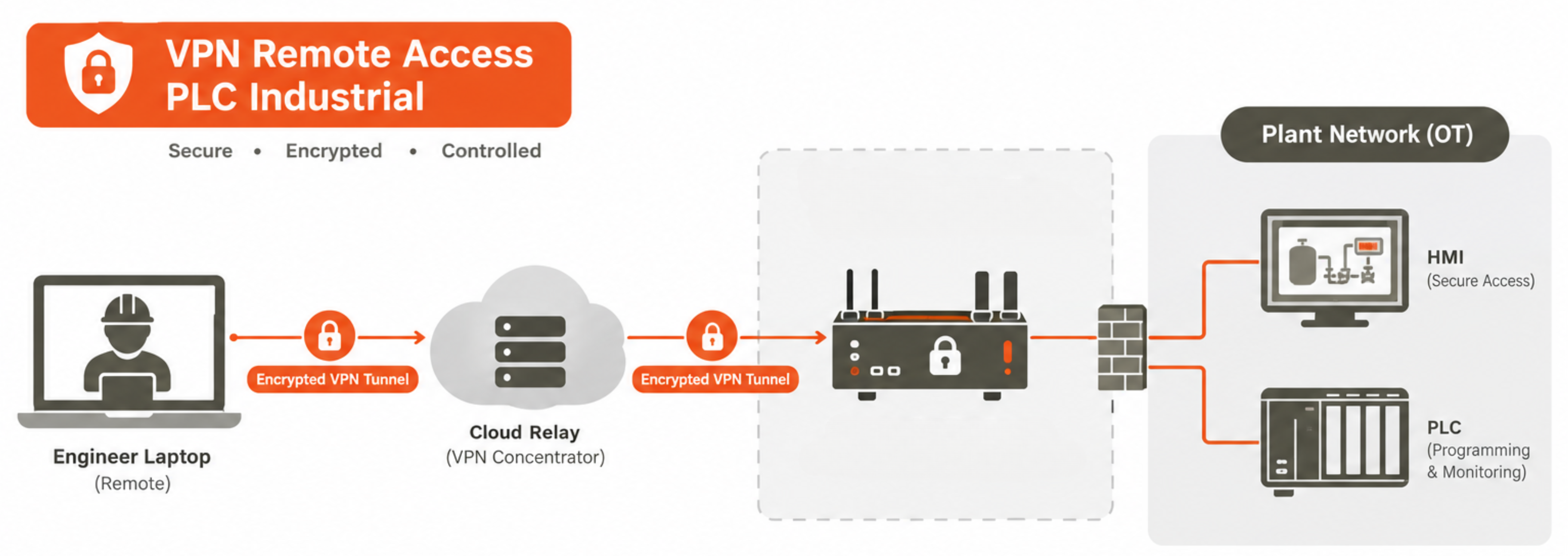
VPN remote access PLC industrial systems have become an operational necessity for plant engineers, system integrators, and OEM vendors who need to monitor, diagnose, and maintain PLCs, HMIs, and SCADA systems at remote sites — whether the site is 50 km away, in another country, or on an offshore platform. The alternative — sending a qualified engineer on-site for every maintenance task, firmware update, or process adjustment — is expensive, slow, and impossible at 3:00 AM when a critical fault alarm requires immediate intervention. Remote PLC monitoring VPN and secure remote HMI access over encrypted tunnels allow maintenance engineers to connect from their office or home, run PLC programming software, make diagnostic queries, adjust setpoints, and download program updates — as if physically at the machine. However, VPN remote access PLC industrial connectivity also introduces significant cybersecurity risk: the remote access channel is the most commonly exploited entry point in industrial remote access security incidents, with stolen VPN credentials or compromised RDP sessions accounting for a large fraction of all OT cyber attacks. The key is implementing VPN remote access PLC industrial with the security controls that distinguish a properly secured industrial remote access architecture from the dangerously exposed configurations that many industrial facilities still operate: mandatory MFA, session recording, vendor-specific time-limited access windows, and machine-specific network access restrictions that prevent a maintenance credential compromise from becoming a plant-wide OT network intrusion.
VPN Remote Access PLC Industrial: Architecture Options
- Dedicated Industrial VPN Gateway (Recommended): Industrial-grade VPN gateway devices (Ewon Cosy/Flexy, Secomea SiteManager, Tosibox Lock) are purpose-built for VPN remote access PLC industrial environments — combining a cellular or broadband internet router, IPsec/SSL VPN concentrator, and stateful firewall in a single DIN-rail mounted device. The device initiates an outbound encrypted tunnel to a cloud relay server (so no inbound firewall port-forwarding is required — a significant industrial remote access security advantage), and the remote engineer connects through the relay. Machine-specific access control at the network level ensures that remote PLC monitoring VPN credentials for Machine A cannot reach Machine B's PLC network.
- IPsec VPN Industrial Gateway via IIoT Router: IPsec VPN industrial gateway implementations use standard IPsec IKEv2 tunnels between an industrial 4G LTE router at the plant site and a corporate VPN concentrator at the maintenance centre. This approach integrates with existing corporate IT VPN infrastructure and works well for corporate-managed maintenance teams. IPsec VPN industrial gateway configurations must include strict firewall policies restricting OT network access to only the specific PLCs and protocols required — the IT VPN default of full network access is inappropriate for OT. Source IP allowlisting and time-based firewall rules are essential security controls for IPsec VPN industrial gateway industrial access.
- Cloud-Brokered IIoT Platform Remote Access: IIoT cloud platforms increasingly offer secure remote HMI access through browser-based web HMIs or VNC/RDP proxies hosted in the cloud — the engineer accesses the SCADA HMI or PLC status via a web browser authenticated to the cloud platform, without a traditional VPN. This approach centralises industrial remote access security management (one cloud platform manages all site credentials, sessions, and audit logs), scales easily across many sites, and requires no client VPN software — but requires that the cloud platform implements strong secure remote HMI access controls: MFA, RBAC, session recording, and protocol restriction.
- Industrial Remote Access Security — Essential Controls: Regardless of the VPN remote access PLC industrial technology chosen, industrial remote access security requires: MFA for every session; credential vaulting (engineers authenticate to the access platform, which holds the actual PLC/HMI credentials — engineers never know or share the device password); session recording; least-privilege access (remote engineer can reach only their specific machine, not the entire OT network); automatic session timeout (30 minutes inactivity); and connection event alerting.
VPN Remote Access PLC Industrial: Architecture Comparison
| Solution Type | Remote PLC Monitoring VPN Capability | Industrial Remote Access Security Strength |
|---|---|---|
| Dedicated Industrial VPN Gateway | Full PLC programming access; machine-specific firewall; outbound tunnel | Highest — purpose-built for OT; machine-level access control |
| IPsec VPN Industrial Gateway | Full OT network access (requires strict firewall policy) | High if configured correctly; risk of over-broad access without OT-specific rules |
| Cloud IIoT Platform Access | Browser HMI, read-only SCADA, limited PLC access | High with MFA, RBAC, and audit logging — no client VPN required |
| Direct RDP/VNC (no VPN) | Full SCADA/HMI access — widely used but insecure | Critical risk — never expose RDP/VNC directly to internet |
Secure Remote Access and IIoT with Precisol Automation
Precisol Automation's Serial IIoT Gateway provides remote PLC monitoring VPN-independent data access — the gateway collects Modbus field data and publishes via encrypted MQTT to the cloud, enabling remote monitoring without opening a PLC programming VPN session for routine data visibility. This reduces the frequency of VPN remote access PLC industrial sessions to actual maintenance events, shrinking the remote access attack surface. The PreciCloud IoT Cloud Dashboard provides secure remote HMI access to live process data with role-based access and audit logging — eliminating many routine VPN remote access PLC industrial monitoring sessions.
See IT-OT remote connectivity in our IT-OT bridge for process automation case study, or explore remote monitoring for Modbus PLCs for the IIoT gateway approach to remote visibility that reduces reliance on industrial remote access security-sensitive VPN sessions.
Frequently Asked Questions
How does VPN remote access for PLC and HMI work in industrial environments?
VPN remote access PLC industrial works by establishing an encrypted IPsec or TLS tunnel between the remote engineer's laptop and a VPN gateway device in the industrial DMZ. Once authenticated (MFA required), PLC programming software communicates through the tunnel to the target PLC as if locally connected. Industrial remote access security requires machine-specific access control, time-window restrictions, automatic timeout, and session recording — beyond standard IT VPN implementations that grant broad OT network access.
What is the difference between industrial VPN and consumer VPN for remote PLC access?
Remote PLC monitoring VPN solutions designed for OT (Ewon Cosy, Secomea, Tosibox) restrict access to specific machines and protocols — unlike consumer/business VPN that grants full network access. IPsec VPN industrial gateway devices initiate outbound tunnels (no inbound firewall rules needed), enforce machine-level firewalls, support session recording, and integrate MFA. Secure remote HMI access for industrial environments needs machine-level access control that generic IT VPN products do not provide by default.
What security controls are required for industrial remote access to prevent OT cyber attacks?
Industrial remote access security requires: MFA for every VPN remote access PLC industrial session; credential vaulting (engineers never know device passwords); role-based access to specific machines only; session recording for audit; automatic timeout; maintenance window enforcement; vendor access time-limited per contract; and connection event alerting. Never expose RDP or VNC directly to the internet — always route secure remote HMI access through a VPN or cloud platform with these controls.